Win10使用PowerShelll让Cortana朗读小说的操作技巧
Win10如何使用PowerShelll让Cortana朗读小说?Cortana是Win10系统的人工智能助手,可以帮忙处理一些基本任务,比如日程安排、回答问题等,其实Cortana还有更为强大的功能,比如让Cortana为我们朗读小说,这才不浪费Cortana甜美的声音嘛!下面给大家介绍Win10使用PowerShelll让Cortana朗读小说的操作技巧。

图1:Cortana
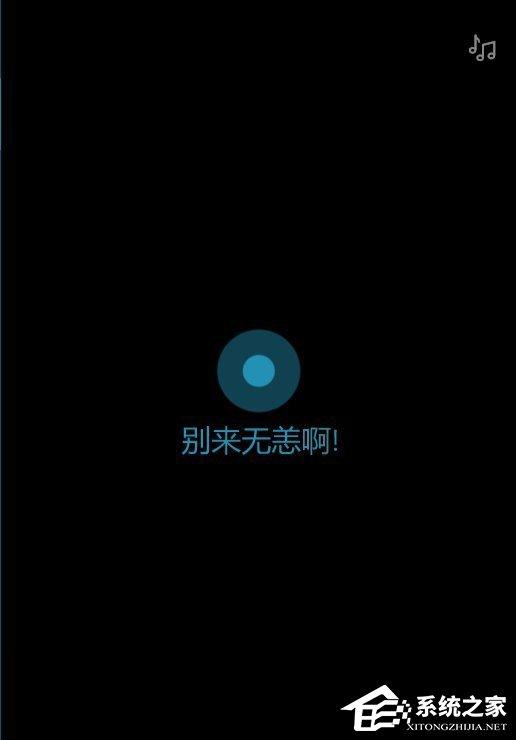
图2:来至微软小娜的问候
Win10如何使用PowerShelll让Cortana朗读小说?
1、把下面的代码复制为.ps1文件保存好,打开PowerShell(管理员),把执行.ps1文件。当然也可以复制之后直接执行命令,都是一样的效果。
- 01 = "HKLM:\SOFTWARE\Microsoft\Speech_OneCore\Voices\Tokens\MSTTS_V110_zhCN_HongyuM"
- 02 = "HKLM:\SOFTWARE\Microsoft\Speech_OneCore\Voices\Tokens\MSTTS_V110_zhCN_HongyuM\Attributes"
- 03 = "HKLM:\SOFTWARE\Microsoft\Speech\Voices\Tokens\MSTTS_V110_zhCN_HongyuM"
- 04 = "HKLM:\SOFTWARE\Microsoft\Speech\Voices\Tokens\MSTTS_V110_zhCN_HongyuM\Attributes"
- 05 New-Item -Path ,,,
- 06 New-ItemProperty -Path , -Name "(default)" -PropertyType string -Value "Microsoft Hongyu Mobile - Chinese (Simplified, PRC)"
- 07 New-ItemProperty -Path , -Name LangDataPath -PropertyType string -Value "%windir%\\Speech_OneCore\\Engines\\TTS\\zh-CN\\MSTTSLoczhCN.dat"
- 08 New-ItemProperty -Path , -Name LangUpdateDataDirectory -PropertyType string -Value "%SystemDrive%\\Data\\SharedData\\Speech_OneCore\\Engines\\TTS\\zh-CN"
- 09 New-ItemProperty -Path , -Name VoicePath -PropertyType string -Value "%windir%\\Speech_OneCore\\Engines\\TTS\\zh-CN\\M2052Hongyu"
- 10 New-ItemProperty -Path , -Name VoiceUpdateDataDirectory -PropertyType string -Value "%SystemDrive%\\Data\\SharedData\\Speech_OneCore\\Engines\\TTS\\zh-CN"
- 11 New-ItemProperty -Path , -Name 804 -PropertyType string -Value "Microsoft Hongyu Mobile - Chinese (Simplified, PRC)"
- 12 New-ItemProperty -Path , -Name CLSID -PropertyType string -Value "{179F3D56-1B0B-42B2-A962-59B7EF59FE1B}"
- 13 New-ItemProperty -Path , -Name Version -PropertyType string -Value "11.0"
- 14 New-ItemProperty -Path , -Name Language -PropertyType string -Value "804"
- 15 New-ItemProperty -Path , -Name Gender -PropertyType string -Value "Female"
- 16 New-ItemProperty -Path , -Name Age -PropertyType string -Value "Adult"
- 17 New-ItemProperty -Path , -Name DataVersion -PropertyType string -Value "11.0.2013.1022"
- 18 New-ItemProperty -Path , -Name SharedPronunciation -PropertyType string -Value ""
- 19 New-ItemProperty -Path , -Name Name -PropertyType string -Value "Microsoft Hongyu Mobile"
- 20 New-ItemProperty -Path , -Name Vendor -PropertyType string -Value "Microsoft"
- 21 New-ItemProperty -Path , -Name PersonalAssistant -PropertyType string -Value "1"
复制代码
="HKLM:\SOFTWARE\Microsoft\Speech_OneCore\Voices\Tokens\MSTTS_V110_zhCN_HongyuM"="HKLM:\SOFTWARE\Microsoft\Speech_OneCore\Voices\Tokens\MSTTS_V110_zhCN_HongyuM\Attributes"= "HKLM:\SOFTWARE\Microsoft\Speech\Voices\Tokens\MSTTS_V110_zhCN_HongyuM" ="HKLM:\SOFTWARE\Microsoft\Speech\Voices\Tokens\MSTTS_V110_zhCN_HongyuM\Attributes"New-Item -Path ,,, New-ItemProperty -Path , -Name "(default)" -PropertyTypestring -Value "Microsoft Hongyu Mobile - Chinese (Simplified, PRC)" New-ItemProperty -Path , -Name LangDataPath -PropertyType string -Value"%windir%\\Speech_OneCore\\Engines\\TTS\\zh-CN\\MSTTSLoczhCN.dat" New-ItemProperty -Path , -Name LangUpdateDataDirectory -PropertyType string -Value"%SystemDrive%\\Data\\SharedData\\Speech_OneCore\\Engines\\TTS\\zh-CN"New-ItemProperty -Path , -Name VoicePath -PropertyType string -Value"%windir%\\Speech_OneCore\\Engines\\TTS\\zh-CN\\M2052Hongyu" New-ItemProperty -Path , -Name VoiceUpdateDataDirectory -PropertyType string-Value"%SystemDrive%\\Data\\SharedData\\Speech_OneCore\\Engines\\TTS\\zh-CN"New-ItemProperty -Path , -Name 804 -PropertyType string -Value "MicrosoftHongyu Mobile - Chinese (Simplified, PRC)" New-ItemProperty -Path , -NameCLSID -PropertyType string -Value "{179F3D56-1B0B-42B2-A962-59B7EF59FE1B}"New-ItemProperty -Path , -Name Version -PropertyType string -Value "11.0" New-ItemProperty -Path , -Name Language -PropertyType string -Value "804" New-ItemProperty -Path , -Name Gender -PropertyType string -Value "Female" New-ItemProperty -Path , -Name Age -PropertyType string -Value "Adult" New-ItemProperty -Path , -Name DataVersion -PropertyType string -Value"11.0.2013.1022" New-ItemProperty -Path , -Name SharedPronunciation-PropertyType string -Value "" New-ItemProperty -Path , -Name Name-PropertyType string -Value "Microsoft Hongyu Mobile" New-ItemProperty -Path ,-Name Vendor -PropertyType string -Value "Microsoft" New-ItemProperty -Path ,-Name PersonalAssistant -PropertyType string -Value "1"
2、接下来打开“控制面板”,找到“语音识别”,点击左侧窗口中的“文本到语音转换”,在“语音选择”框中选择“Microsoft HongyuMobile - Chinese (Simplified,PRC)”,然后单击确定按钮,你就可以让微软小娜为你阅读文本了。阅读文本内容可以使用带有文本阅读功能的文本编辑器,或者使用专门的小说阅读器,大家自己选一个自己喜欢的就行了。
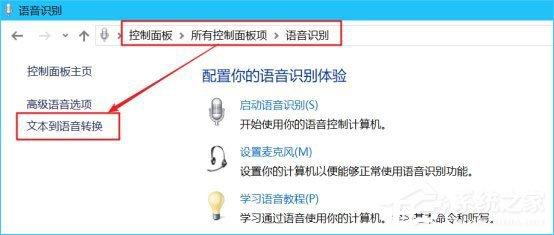
图3:选择小娜的语音
3、下面贴一段用PowerShell阅读小说的代码,同样保存为.ps1文件,然后在.ps1文件上右键,选择“使用“使用PowerShell运行”,之后把txt小说拖到PowerShell窗口中,回车,小娜就会自动为你朗读小说了,再次回车就会退出朗读!
- 01 = Read-Host -Prompt "把小说拖到此处并回车开始朗读"
- 02 = New-Object -ComObject SAPI.SpVoice
- 03.Speak(,5)
- 04 Read-Host -Prompt "回车退出朗读"
复制代码
= Read-Host -Prompt "把小说拖到此处并回车开始朗读" = New-Object -ComObject SAPI.SpVoice.Speak(,5) Read-Host -Prompt "回车退出朗读"
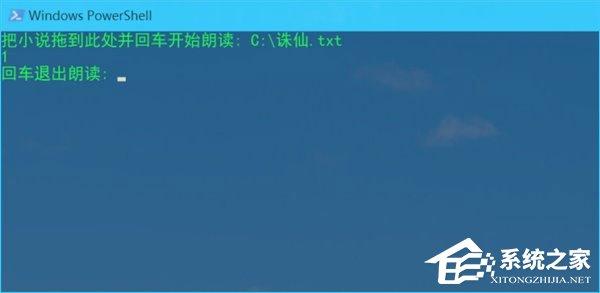
图4:使用小娜朗读小说
上述便是让Cortana为我们朗读小说的操作方法,喜欢阅读的伙伴,如果看书看累了,不妨让小娜为您朗读哦!
推荐系统
雨林木风 winxp下载 纯净版 永久激活 winxp ghost系统 sp3 系统下载
 64位系统大小:0MB系统类型:WinXP
雨林木风在系统方面技术积累雄厚深耕多年,打造了国内重装系统行业知名品牌,雨林木风WindowsXP其系统口碑得到许多人认可,积累了广大的用户群体,是一款稳定流畅的系统,雨林木风 winxp下载 纯净版 永久激活 winxp ghost系统 sp3 系统下载,有需要的朋友速度下载吧。
系统等级:进入下载 >萝卜家园win7纯净版 ghost系统下载 x64 联想电脑专用
 64位系统大小:0MB系统类型:Win7
萝卜家园win7纯净版是款非常纯净的win7系统,此版本优化更新了大量的驱动,帮助用户们进行舒适的使用,更加的适合家庭办公的使用,方便用户,有需要的用户们快来下载安装吧。
系统等级:进入下载 >雨林木风xp系统 xp系统纯净版 winXP ghost xp sp3 纯净版系统下载
 64位系统大小:1.01GB系统类型:WinXP
雨林木风xp系统 xp系统纯净版 winXP ghost xp sp3 纯净版系统下载,雨林木风WinXP系统技术积累雄厚深耕多年,采用了新的系统功能和硬件驱动,可以更好的发挥系统的性能,优化了系统、驱动对硬件的加速,加固了系统安全策略,运行环境安全可靠稳定。
系统等级:进入下载 >萝卜家园win10企业版 免激活密钥 激活工具 V2023 X64位系统下载
 64位系统大小:0MB系统类型:Win10
萝卜家园在系统方面技术积累雄厚深耕多年,打造了国内重装系统行业的萝卜家园品牌,(win10企业版,win10 ghost,win10镜像),萝卜家园win10企业版 免激活密钥 激活工具 ghost镜像 X64位系统下载,其系统口碑得到许多人认可,积累了广大的用户群体,萝卜家园win10纯净版是一款稳定流畅的系统,一直以来都以用户为中心,是由萝卜家园win10团队推出的萝卜家园
系统等级:进入下载 >萝卜家园windows10游戏版 win10游戏专业版 V2023 X64位系统下载
 64位系统大小:0MB系统类型:Win10
萝卜家园windows10游戏版 win10游戏专业版 ghost X64位 系统下载,萝卜家园在系统方面技术积累雄厚深耕多年,打造了国内重装系统行业的萝卜家园品牌,其系统口碑得到许多人认可,积累了广大的用户群体,萝卜家园win10纯净版是一款稳定流畅的系统,一直以来都以用户为中心,是由萝卜家园win10团队推出的萝卜家园win10国内镜像版,基于国内用户的习惯,做
系统等级:进入下载 >windows11下载 萝卜家园win11专业版 X64位 V2023官网下载
 64位系统大小:0MB系统类型:Win11
萝卜家园在系统方面技术积累雄厚深耕多年,windows11下载 萝卜家园win11专业版 X64位 官网正式版可以更好的发挥系统的性能,优化了系统、驱动对硬件的加速,使得软件在WINDOWS11系统中运行得更加流畅,加固了系统安全策略,WINDOWS11系统在家用办公上跑分表现都是非常优秀,完美的兼容各种硬件和软件,运行环境安全可靠稳定。
系统等级:进入下载 >
相关文章
- Win11内存完整性无法关闭的解决方法
- Win11 Wifi无法连接网络的解决方法
- Win7安装Office2010提示缺少MSXML组件怎么办?
- Win7的C盘扩展卷是灰色解决方法
- 笔记本如何用U盘重装Win7旗舰版系统?
- Win11怎么看电脑的型号和配置-Win11查看电脑型号和配置的方法
- 惠普笔记本Win7系统一键重装怎么操作?
- Win7按f8无法进入安全模式怎么办
- Win11重装之后不能联网怎么办-Win11重装之后不能联网的解决方法
- Win11系统Dns网络服务器未响应怎么办-Dns网络服务器未响应的解决方法
- Win11怎么手动设置ip地址和dns-手动设置ip地址和dns的方法
- Win11鼠标速度调不了怎么办
- Win11更新后无法启动怎么办
- Win11无法卸载edge浏览器怎么办-Win11卸载edge浏览器的方法
热门系统
- 1微软最新版win10 LTSC X64位 纯净版系统 windows10 LTSC 系统下载
 系统大小:4.4GB系统类型:Win10
 - 2雨林木风Win11游戏版系统下载 windows11 64位游戏专用版本V2021
 系统大小:4.38GB系统类型:Win11
 - 3微软Win11系统 64位 正式版Ghost Windows11镜像 2022.05
 系统大小:4.55GB系统类型:Win11
 - 4深度技术 Windows7 纯净版64位下载 v2021.09
 系统大小:3.9GB系统类型:Win7
 - 5大地系统 Win11精简稳定版 GHOST镜像 X64位 V2022.06下载
 系统大小:4.7GB系统类型:Win11
推荐软件

























热门文章
常用系统
- 1windows7游戏版下载 番茄花园64位专业电竞版 ISO镜像 华硕电脑专用下载
 系统大小:0MB系统类型:Win7
 - 2技术员联盟GHOST WinXP系统 最新通用装机版 v2022.01
 系统大小:1.01GB系统类型:WinXP
 - 3【惠普通用】惠普 HP Windows10 64位 专业装机版
 系统大小:0MB系统类型:Win10
 - 4WindowsXP旗舰版下载 萝卜家园32位正式版 ghost镜像下载 免激活工具
 系统大小:0MB系统类型:WinXP
 - 5Win11企业版 免密钥激活番茄花园win11 ghost系统 ISO镜像 X64位 下载
 系统大小:4.68GB系统类型:Win11
 - 6Windows10最新专业版 外星人系统x64位下载 激活工具 惠普笔记本专用下载
 系统大小:0MB系统类型:Win10
 - 7萝卜家园x64位高级版 win11家庭版下载 GHOST镜像 笔记本专用下载
 系统大小:0MB系统类型:Win11
 - 8风林火山win10稳定版 x86装机版下载 永久激活 ghost镜像下载
 系统大小:0MB系统类型:Win10
 - 9【国庆特别版】番茄花园Windows11高性能专业版ghost系统 ISO镜像下载
 系统大小:4.68GB系统类型:Win11